StorageRadar
Privacy-first storage analysis and cleanup for macOS. Treemap visualization, developer environment cleanup (Xcode, npm, Docker), app uninstaller, and MCP integration for AI agents.
$ specsheet storageradar
- role
- Solo developer
- year
- 2026
- platforms
- macOS 14+
- stack
- Swift · SwiftUI · AppKit · MCP
- status
- released
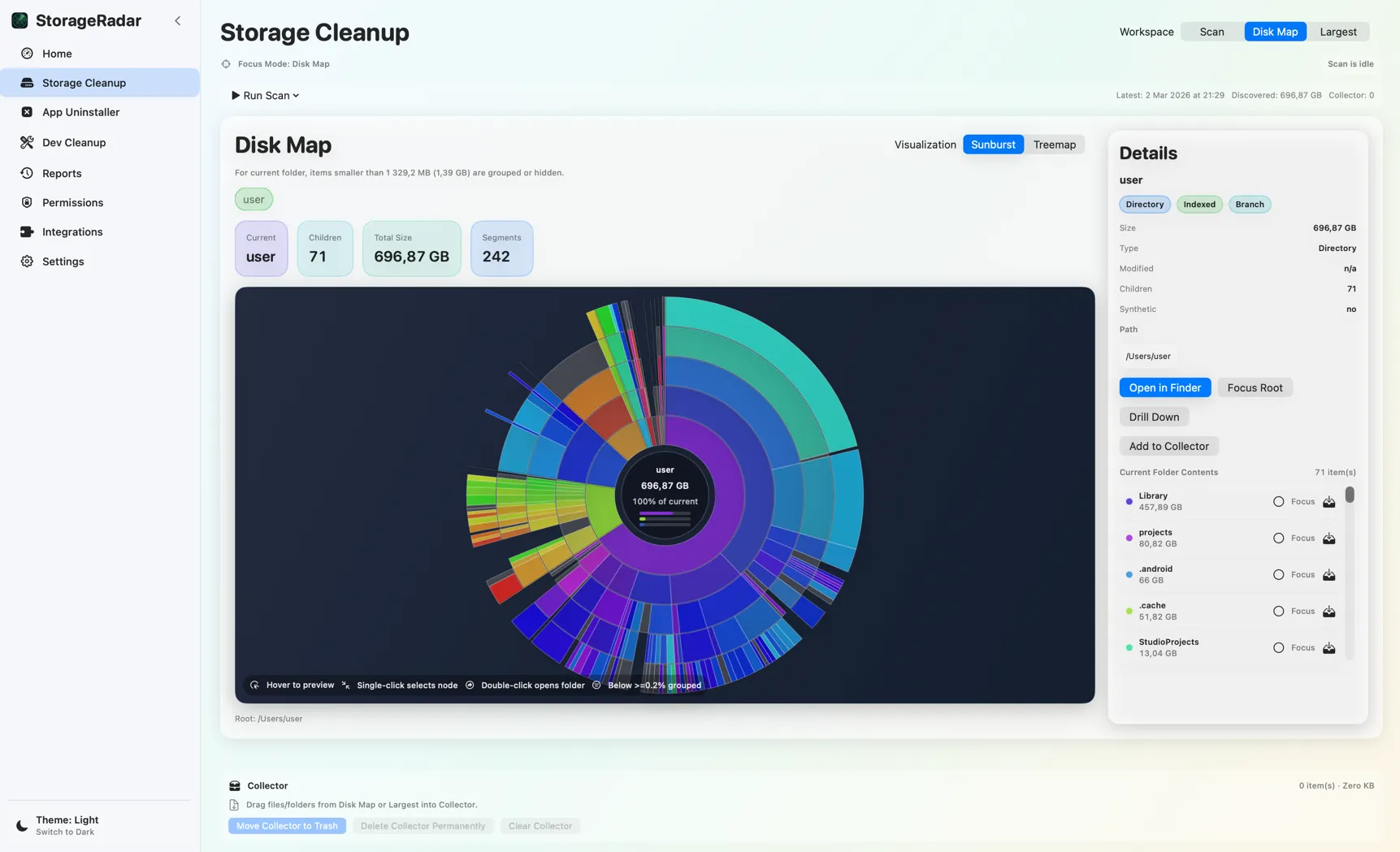
StorageRadar is a privacy-first storage analysis and cleanup app for macOS 14+, built for developers. It visualizes disk usage with interactive treemap and sunburst charts, safely reclaims developer waste (Xcode, npm, Docker, Gradle), and is the first macOS utility with native Model Context Protocol (MCP) support for AI agents. Everything runs locally with dry-run previews before any deletion.
Problem
macOS users, especially developers, accumulate gigabytes of invisible waste: Xcode device support files, npm caches, Docker images, Gradle build artifacts. Existing tools either send data to the cloud, miss developer-specific cleanup scenarios, or lack the visualization to understand storage at a glance.
Solution
StorageRadar is a fully local storage analysis and cleanup tool for macOS, built specifically with developers in mind. It visualizes disk usage with an interactive treemap and sunburst chart, surfaces developer environment waste with smart detection, and provides a safe cleanup workflow with dry-run support.
Engineering Highlights
- Interactive visualization: treemap and sunburst modes for intuitive storage navigation.
- Developer-aware cleanup: detects and safely removes Xcode device support, Derived Data, npm/pnpm/Yarn caches, Docker volumes, Gradle caches, and more.
- App uninstaller: deep uninstall with risk labels that identify associated files, caches, preferences, and support files per app.
- Snapshots & diffs: periodic storage snapshots with diff comparison to track what grew.
- MCP integration: local Model Context Protocol endpoint at 127.0.0.1 that exposes storage analysis to AI agents. The first macOS utility with native MCP support.
- Privacy-first: zero telemetry, zero cloud sync, zero remote connections. Everything runs locally.
- Dry-run by default: all cleanup operations show a preview before any deletion.
Platform Constraints
Accessing certain protected directories requires explicit user-granted permissions via macOS security APIs. The app is sandboxed and requests only the permissions it needs, scoped to user-selected paths.
Outcome
Available on the Mac App Store as a one-time purchase with three tiers: Free, User ($9.99), and Developer ($19.99). No subscription.
$ open ./screenshots
Screenshots